

It only took one email. At a school we support, a fraudulent email with a booby-trapped attachment was opened on an administration computer. That one small action triggered a chain of events that exposed the entire school — pupils, parents and suppliers included. Here’s how it happened, and how GET Conseil responded.
How the attack unfolded
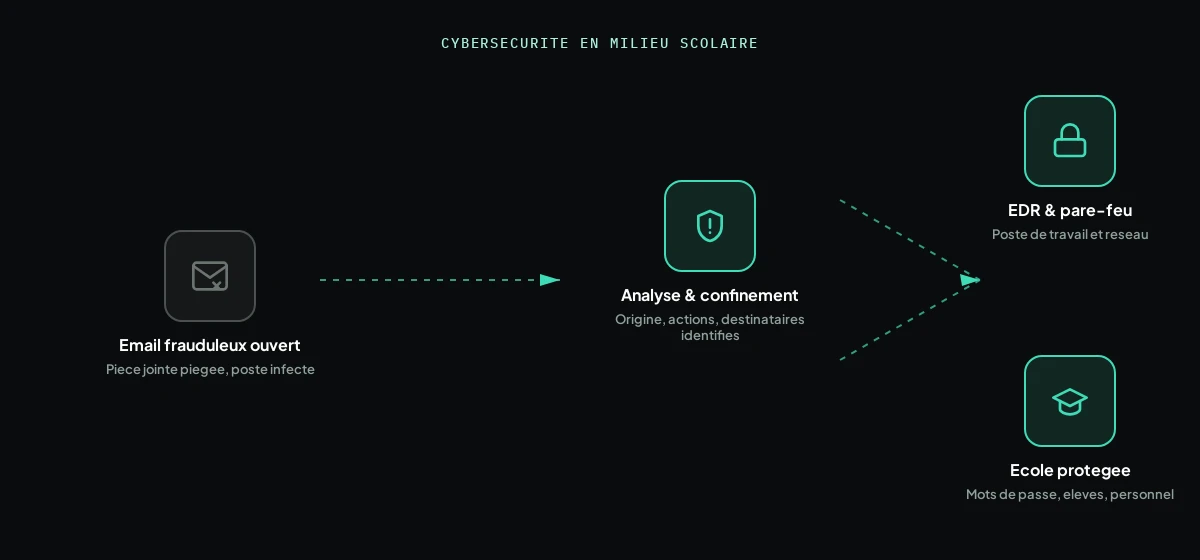
It all started with a fraudulent email, seemingly legitimate, received on one of the school’s administration computers. The attachment was opened, and the computer became infected. The attacker then obtained an administration password — the incident escalated from a single infected computer to direct access to the school’s official mailbox.
From that compromised mailbox, the attacker sent a series of fraudulent emails — not only to parents, but also to the school’s suppliers. This is exactly what makes this type of attack dangerous: the messages go out from a legitimate, known address, which makes them far more convincing to their recipients.
Our response: understand before fixing
Before fixing anything, one simple question had to be answered: where did the attack come from? GET Conseil carried out an in-depth investigation of the incident to reconstruct precisely what had happened:
- How the attacker got into the system
- What actions were taken once access was obtained
- Who the fraudulent emails were sent to
This investigation step is essential: skip it, and you risk closing one door while leaving another wide open. It also makes it possible to precisely inform the people affected (parents, suppliers) about the real nature of the fraudulent message they received.
The fix: passwords, EDR and a firewall
Once the origin and scope of the attack were identified, GET Conseil put a multi-part remediation in place:
- Changing compromised passwords, starting with the administration account
- Deploying an EDR solution (Endpoint Detection & Response) to detect and block this type of threat directly on the workstations
- Setting up a firewall to protect not just the affected computer, but the school’s entire IT network
In a school, this protection doesn’t stop at the administration office: it also covers the computers used by pupils, who often share the same network. The goal was to secure the whole infrastructure, not just the initial point of entry.
What to take away from this
This attack didn’t start with a sophisticated technical flaw, but with one opened email. It’s the most common scenario, and the hardest to eliminate 100%: human vigilance has its limits, which makes technical detection (EDR, firewall, monitoring) essential as a backstop. A school, with its many accounts (staff, pupils, parents) and frequent exchanges with suppliers, is a particularly exposed target for this type of fraud.
Want to assess your organisation’s exposure to this type of attack? Discover our cybersecurity offer for schools and SMEs, or get in touch to discuss it.
Frequently asked questions
What is an EDR, and how is it different from a traditional antivirus?
An EDR (Endpoint Detection & Response) continuously monitors workstation behaviour to detect suspicious actions, even previously unknown ones, and can respond automatically (isolating the machine, blocking it). A traditional antivirus generally just compares files against a list of already-known threats.
How can we tell if our organisation has already been compromised?
Signs like unexpected bounced emails, complaints from recipients who never asked for anything, or unusual behaviour on a computer can be indicators. A technical investigation remains the only way to confirm it with certainty — exactly what GET Conseil offers if you have any doubt.
Is a school really a target for this type of attack?
Yes. Schools manage many accounts (staff, pupils, families) and regularly exchange emails with suppliers, which makes them an attractive target for impersonation attacks — exactly the scenario in this case.
What should you do if you get a suspicious email from an organisation you know?
Don’t click any links or open any attachments, and verify the information directly with the organisation through a different channel (phone) before taking any action.