
In an increasingly security-conscious world, video surveillance has become a necessity for many businesses, local authorities and individuals. However, many existing setups are ageing, limited in functionality, or not making full use of recent technological advances such as artificial intelligence (AI).

“Synology Surveillance Station stands out as the solution of choice for an efficient, powerful and intuitive upgrade to your video surveillance system.”
2. Easy migration of an existing camera fleet
One of Synology Surveillance Station’s major strengths lies in its compatibility with a wide range of IP cameras, which lets you migrate and integrate your existing cameras without having to replace your whole fleet. Whether they’re ONVIF cameras, analogue cameras connected via encoders, or older models, Synology supports over 8,000 different models. That means you can keep your current equipment while benefiting from the powerful features of the Synology platform.
- No unnecessary costs: you don’t need to replace your current cameras, which considerably cuts equipment renewal costs.
- Universal compatibility: Synology supports a wide range of camera brands and models, ensuring a smooth migration with no technical constraints.
- Protecting past investments: by integrating your current infrastructure, you maximise the return on investment of your existing cameras while gaining access to cutting-edge features.
3. Use artificial intelligence for proactive monitoring
With Synology Surveillance Station, you can do far more than simply record footage. Thanks to the advanced artificial intelligence (AI) features of Synology’s DVA Deep Learning NVR system, your surveillance system becomes a genuine proactive security tool.
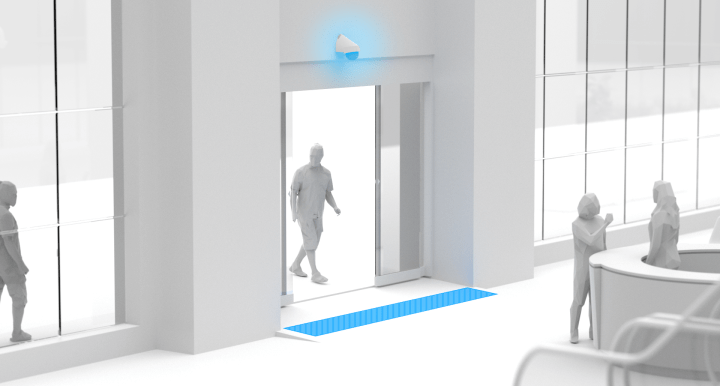
- Facial recognition and intrusion detection: built-in AI can recognise faces, identify suspicious behaviour or detect unattended objects, considerably improving responsiveness in the event of an incident.
- Behavioural analysis: the platform can spot unusual movement or risky behaviour, such as intrusions or crossed boundaries, triggering real-time alerts.
- Smart alert filtering: thanks to AI, the system can reduce the number of false alerts, for example by telling natural movement such as tree branches apart from human movement.
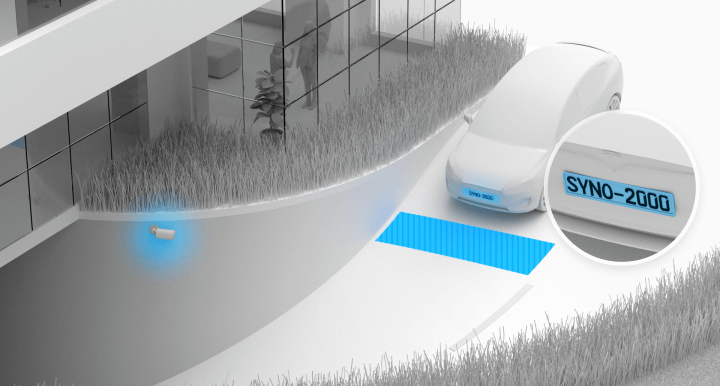
These features don’t just improve security — they also streamline video analysis, making it easier to search for specific events and generate detailed reports.
4. Centralised, simplified management
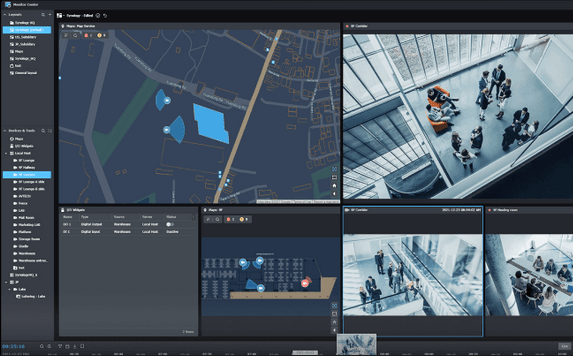
Synology Surveillance Station offers a centralised interface for managing multiple cameras, whether they’re on a single site or spread across several locations.
- Intuitive interface: Surveillance Station’s user interface is friendly and accessible from any web browser or mobile app, letting you monitor your cameras remotely in real time.
- Multi-site supervision: you can group and manage several monitoring sites from a single platform, with unified video feeds, making it easier to manage a multi-site business or local authority.
- Flexible recording and archiving: Surveillance Station lets you store recordings on a local server or a Synology NAS. You can also set up automatic cloud backup systems to keep your data safe in all circumstances.
5. Data security and controlled access
When it comes to security, Synology Surveillance Station places strong emphasis on protecting your data. Your videos are stored securely, with encryption options and robust measures against cyberattacks.
- Data protection: your recordings are encrypted, ensuring only authorised users can access them.
- Fine-grained access control: you can set precise permission levels for each user, for example restricting access to certain cameras or features.
- Recording resilience: with redundancy and cloud backup options, your recordings are protected against data loss even in the event of a hardware failure.
6. Scalability and modularity
Synology Surveillance Station is built to grow with your needs. Whether you want to add one camera or dozens more, the platform scales effortlessly.
- Modular licensing: you only pay for the additional cameras you add, letting the system grow without unnecessary extra cost.
- Optimised performance: the system can handle a large number of video streams simultaneously without compromising quality or responsiveness, ideal for environments with demanding security requirements.
7. Optimised Total Cost of Ownership (TCO)
By choosing Synology Surveillance Station, you not only make the most of your past investments, you also get a robust, scalable solution with no hidden costs or expensive monthly subscriptions.
- No mandatory recurring subscription: unlike other solutions that require subscriptions to access advanced features, Surveillance Station runs with no recurring subscription, making it a more cost-effective solution in the long run.
- Regular support and updates: Synology provides ongoing software maintenance, keeping your system up to date in terms of security and performance at no extra cost.
Conclusion
Investing in a video surveillance solution built on Synology Surveillance Station lets you modernise your existing system while harnessing the most advanced technology available, including artificial intelligence. The easy migration of your current cameras, combined with numerous innovative features, enhanced security and simplified management, make it the ideal solution to improve security while optimising costs.
With Synology, you’re choosing not just a cutting-edge solution, but also flexibility, simplicity and longevity.